One confirmation season, step by step.
Everything below is the real product — its real steps and its real button labels, in the order a season presents them. Four people touch a confirmation: the audit team, the client's director or CFO, the third-party responder, and the reviewing partner. This page follows the season through each of them. The platform is built for the Dutch audit market; Czech is available as an option, and further localizations are planned for later releases.
Part 1: The audit team's season
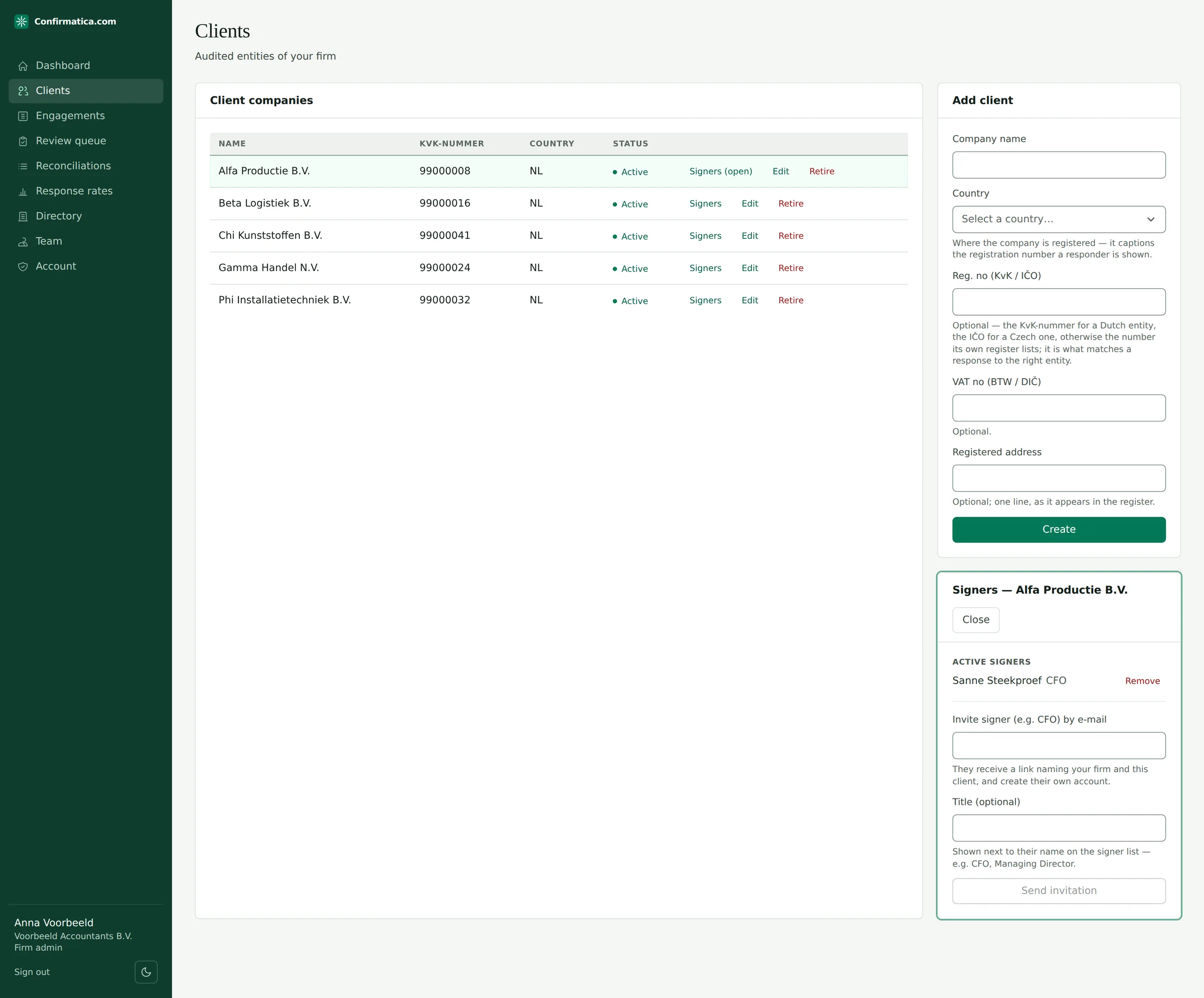
Step 1: Set up the client and the engagement
Create the audited entity under Clients — name, registration number (KvK or IČO), country — and invite the client's signer from the same card. Then create the engagement: client × fiscal period, currency, materiality and performance materiality. Performance materiality is not decoration — it is the tolerable misstatement the ISA 530 sampling interval is derived from later.
Step 2: Import the client ledger — any Dutch, Czech or English export
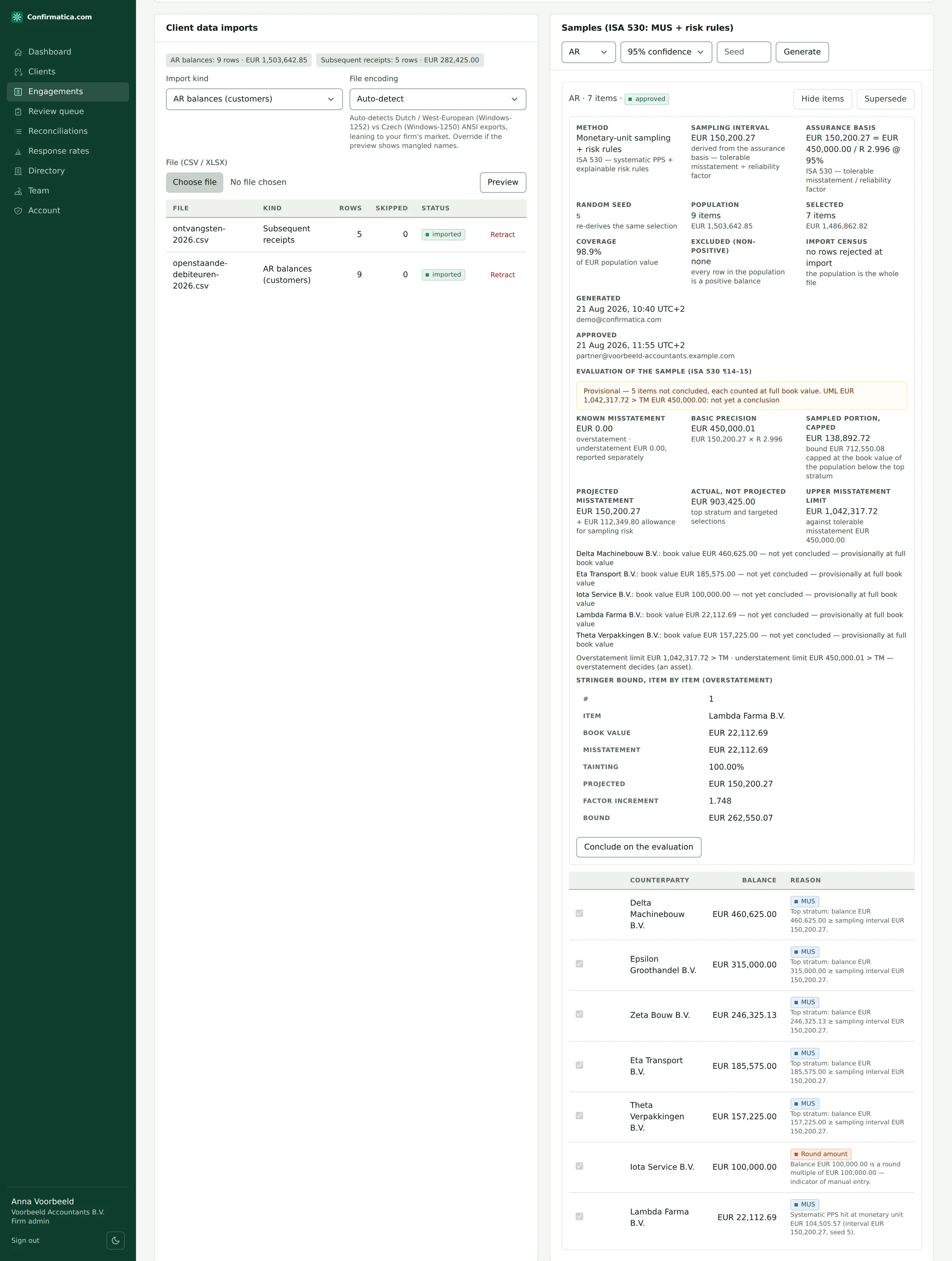
Upload CSV or XLSX from Exact Online, AFAS, Twinfield, Pohoda, Money S3, Helios or SAP-style exports. The two-step import previews the file, suggests a column mapping from Dutch, Czech and English headers, and handles "1 234,56", "1.234,56", "(500)", dd-mm-yyyy dates and mixed code pages — Windows-1250 and Windows-1252 are told apart by scoring, not guessed. Rows the parser cannot read are rejected with the reason and the raw cell, never silently skipped. Re-importing never destroys evidence: prior rows are superseded, not deleted, and the supersession is recorded on the audit trail.
Import kinds: AR balances · AP balances · Bank balances · Open items · Subsequent receipts · Subsequent payments.
Step 3: Generate an ISA 530 sample the partner can defend
A bank population is not sampled at all: every account is confirmed, overdrafts and zero balances included — a census, because an account the ledger records as an overdraft is a liability the bank confirms, not a stratum to be sampled out. Receivables, payables and general balances are sampled as follows.
One click runs Monetary Unit Sampling over positive balances — systematic PPS, top stratum always selected. The interval is performance materiality divided by the reliability factor at the confidence level the auditor states, 95% by default: a performance materiality of 1,200,000 gives an interval of 400,534.05. An auditor who plans the interval another way states it, and the basis, at approval. Explainable risk rules are added on top: round amounts, duplicate counterparty-amount pairs, off-hours postings. Every selected item stores a plain-language reason for the working paper, and the random seed is stored, so the exact sample is re-derivable at review. Curate items, then a partner approves — which locks the roster.
At a glance
- Bank balances
- A census — every account, overdrafts and zero balances included.
- Other balances
- Monetary Unit Sampling, the interval performance materiality over the reliability factor at 95% confidence by default.
- Every selected item
- A plain-language reason for the working paper; the random seed stored.
- Approval
- By a partner, which locks the roster.
Step 4: Build the batch and assign responders from a verified directory
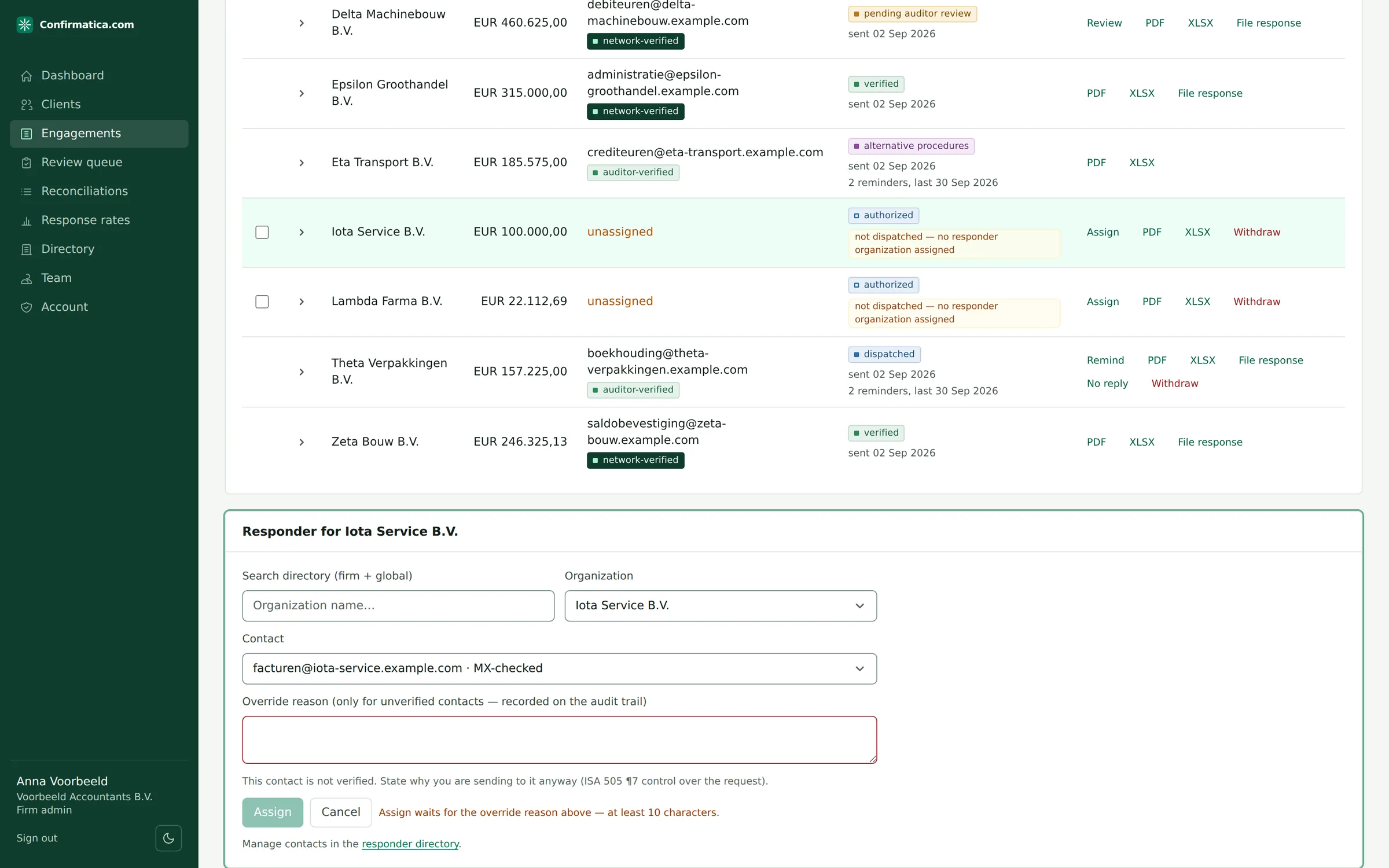
Create a batch from the approved sample — one confirmation per included item, carrying the ledger balance — or add confirmations by hand for any of the eight kinds the platform sends: bank balances, bank relationships, receivables, payables, legal, insurance, leases, or a general balance — with the batch's own as-of date, deadline, reminder policy and letter language: Dutch, English or Czech, end to end.
A legal request is an ISA 501 inquiry to the company's lawyers — litigation, claims and assessments, unbilled fees — and it carries no balance anywhere: the letter asks its questions, the row holds no figure, and the portal offers none to confirm. A bank relationship enquiry is the same shape at a bank: one request per bank rather than per account, asking for every account held, the loans and credit facilities with their limits and terms, the guarantees and sureties given or received, the security and pledges and over which assets, and who may sign — also with no balance anywhere. An insurance confirmation asks an insurer the same way: the policies in force at the as-of date, the sums insured and limits and deductibles under them, the claims notified, and the premiums outstanding — the premium is stated by the insurer and read against the client's records rather than reconciled, so this request too prints no balance and offers none to confirm. A lease confirmation asks a lessor the same way: every lease and rental agreement in force with its asset, its dates and its remaining term, the amount outstanding on the lessor's own basis with the payment schedule, the payments received in the period, and the residual value guarantees, options and security. Its amount is material and the client's ledger holds a relative of it — a lease liability — and the two are still not compared, because they are measured on different bases: the lessor holds the remaining rentals receivable and the client an IFRS 16 present value or, for an operating lease under Dutch or Czech GAAP, nothing at all. The figure is stated, read against the lease schedule by a person, and this request too prints no balance and offers none to confirm.
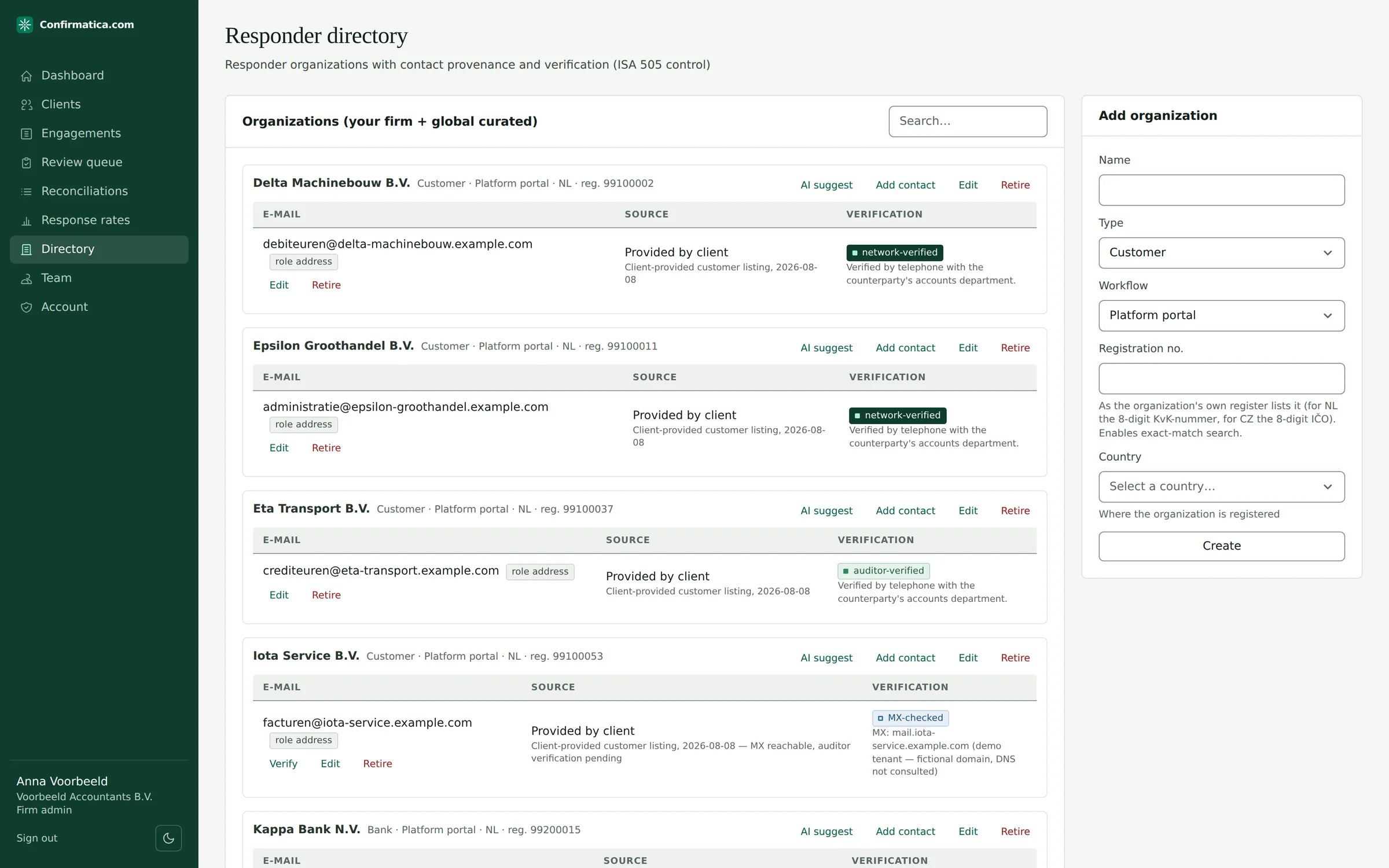
Every responder contact carries provenance (auditor-entered, client-provided, published channel, prior response, AI-suggested) and a verification tier: unverified → MX-checked (an automated pre-check on the e-mail domain, explicitly not the ISA 505 control) → auditor-verified → network-verified. Dispatch is refused below auditor-verified unless an override reason is recorded, and it lands on the audit trail — the ISA 505 / AS 2310 control, applied by the platform rather than written in a policy PDF. A curated directory — Dutch banks, and Czech banks and insurers — is shared with every firm; each entry's legal name and registration number is verified against the public register (DNB, ARES), with the institution's published confirmation channel cited where one was found, and role addresses require a cited published source. AI can suggest published channels, but suggestions are never used automatically — an auditor must verify first.
Step 5: Send the client authorization for signature
From the batch, Send for signature: the platform generates the information-release letter listing every counterparty and e-mails the client's signer a secure signing link — name, e-mail, title, one click. Until it is signed, not one confirmation in the batch can be dispatched.
Step 6: Dispatch — verified, attributable, never undoable
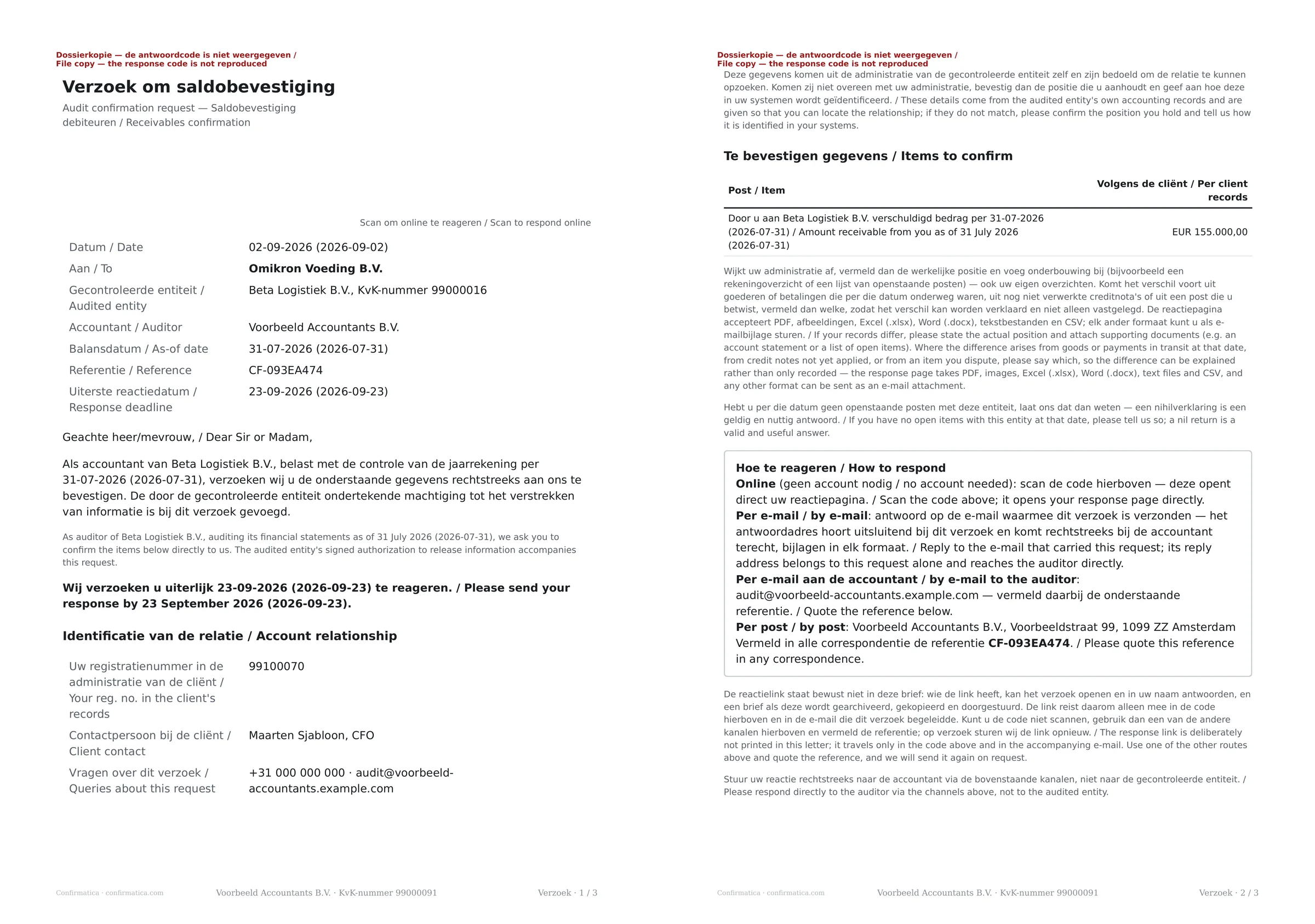
Dispatch authorized confirmations e-mails each assigned responder a covering message carrying the secure portal link and a unique reply-to intake address, with the request letter and the signed authorization attached. The letter itself carries the reference and a QR code that opens the same portal; it prints neither the link nor the intake address, because the letter is the artefact that gets filed, photocopied and forwarded onward. Contacts on paper-only workflows get a print-ready letter that still carries the QR, so even a posted letter can be answered digitally.
Every letter and every e-mail is the firm's own business document, not a vendor's: it carries the firm's registered name, seat and registration number — and its register entry and audit licence where the firm has recorded them — labelled the way the firm's own jurisdiction labels them, and the request comes from the firm. Dispatch is blocked until the seat, the registration number and a phone and mailbox a recipient can verify the request with are all on record, because every letter must name the auditor it comes from. The result reports exactly what was sent and what was skipped, and why.
At a glance
- By e-mail
- A covering message with the portal link and a unique reply-to address.
- On paper
- A print-ready letter that still carries the QR code to the portal.
- Enclosed
- The request letter and the signed authorization.
- Refused
- A contact below auditor-verified with no recorded override reason.
- Undo
- None. The result states what was sent, what was skipped and why.
Step 7: Track the season from the status funnel
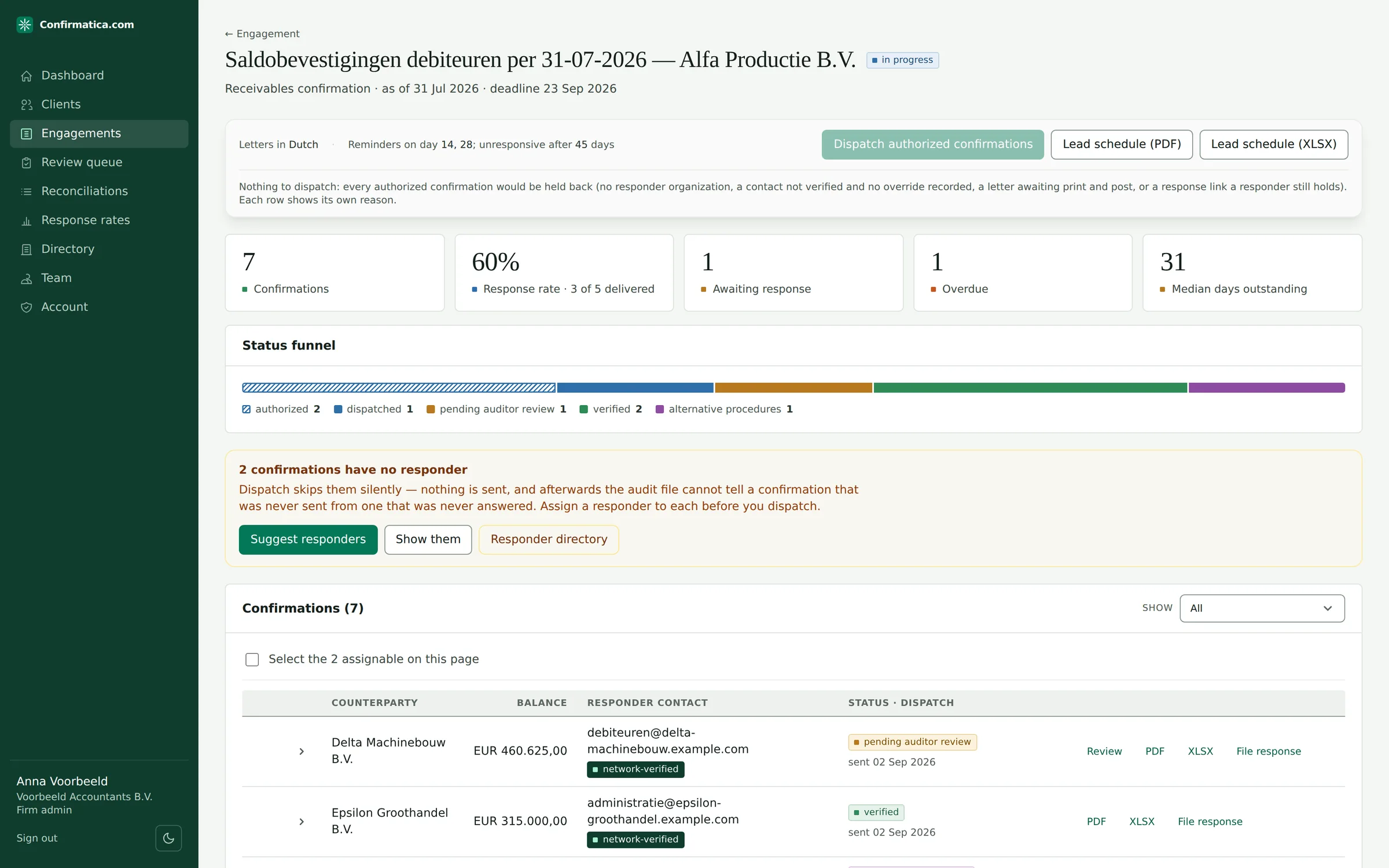
Batch view shows response rate, overdue count and median days outstanding over a colour-coded funnel of the 16 tracked states this batch is actually in. Bounces surface automatically on the affected row. The reminder policy is set per batch by the audit team — which days after dispatch a reminder goes out, when a silent counterparty is marked unresponsive, and whether automated chasing runs at all. The defaults are deliberately patient — a reminder at day 14 and 28, unresponsive at day 45 — and responders who work through their own portal or on paper are never chased by automated e-mail. A counterparty is certified unresponsive only after the chase has run, and never before the date the letter itself gave it to reply — the verdict cannot precede the request.
Step 8: Review what the AI could not prove
Responses run through OCR, extraction constrained to a fixed set of fields, and a verbatim verifier: a number "found" must literally appear in the document text, and validators check currency, as-of date and line-item arithmetic. Only a full validator pass with an exact ledger match, from a sender the request was actually addressed to, auto-accepts. Everything else lands here — source document beside the extracted-versus-ledger comparison — for Accept as extracted, Accept with corrections or Reject. A decision is taken once: a second decision on the same extraction is refused, so two reviewers cannot double-process it. There is no synthetic confidence percentage anywhere: the only confidence shown is the OCR engine's own per-field measurement, labelled as such, and no decision keys on it.
At a glance
- Accepted unattended
- An exact ledger match, with the responder's currency stated and no deterministic check failing, from a sender the request was addressed to.
- Everything else
- A person, with the source document beside the extracted-versus-ledger comparison.
- The decision
- Accept as extracted, accept with corrections, or reject — taken once.
Step 9: Reconcile, explain variances, close non-responders
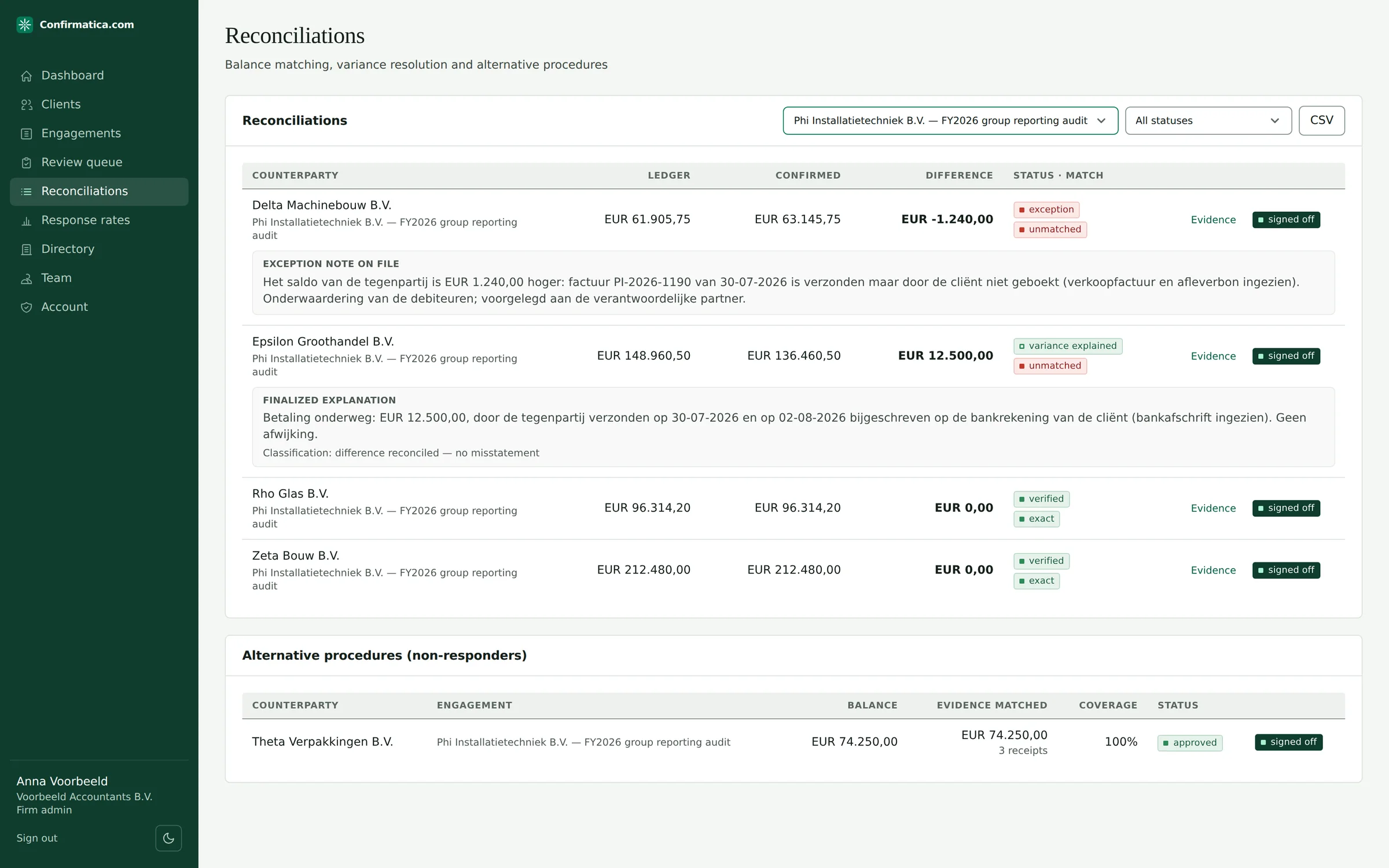
Reconciliation is deterministic first — exact, within-tolerance, currency-mismatch — with semantic name matching (legal suffixes stripped, similarity scored) when the responder states a different name. For variances, the platform scans open items and subsequent receipts for classic in-transit and timing candidates and drafts an explanation the auditor must rewrite or confirm — labelled AI draft — not audit evidence until you confirm or rewrite it.
A receivable or a payable that goes unanswered gets subsequent receipts or subsequent payments matched by the platform, with the coverage achieved and the amount still unsupported both stated; every other instrument gets the procedures the standard expects named, for the auditor to perform and attach — and a conclusion the platform refuses to write at all.
At a glance
- Matching
- Deterministic first: exact, within tolerance, currency mismatch.
- A difference
- Open items and subsequent receipts scanned for in-transit and timing candidates.
- A drafted explanation
- Labelled a draft, and not audit evidence until the auditor confirms or rewrites it.
- No answer
- Receipts or payments matched for receivables and payables; every other instrument is the auditor's to evidence, and every conclusion the auditor's to write.
Step 10: Working papers and the evidence pack
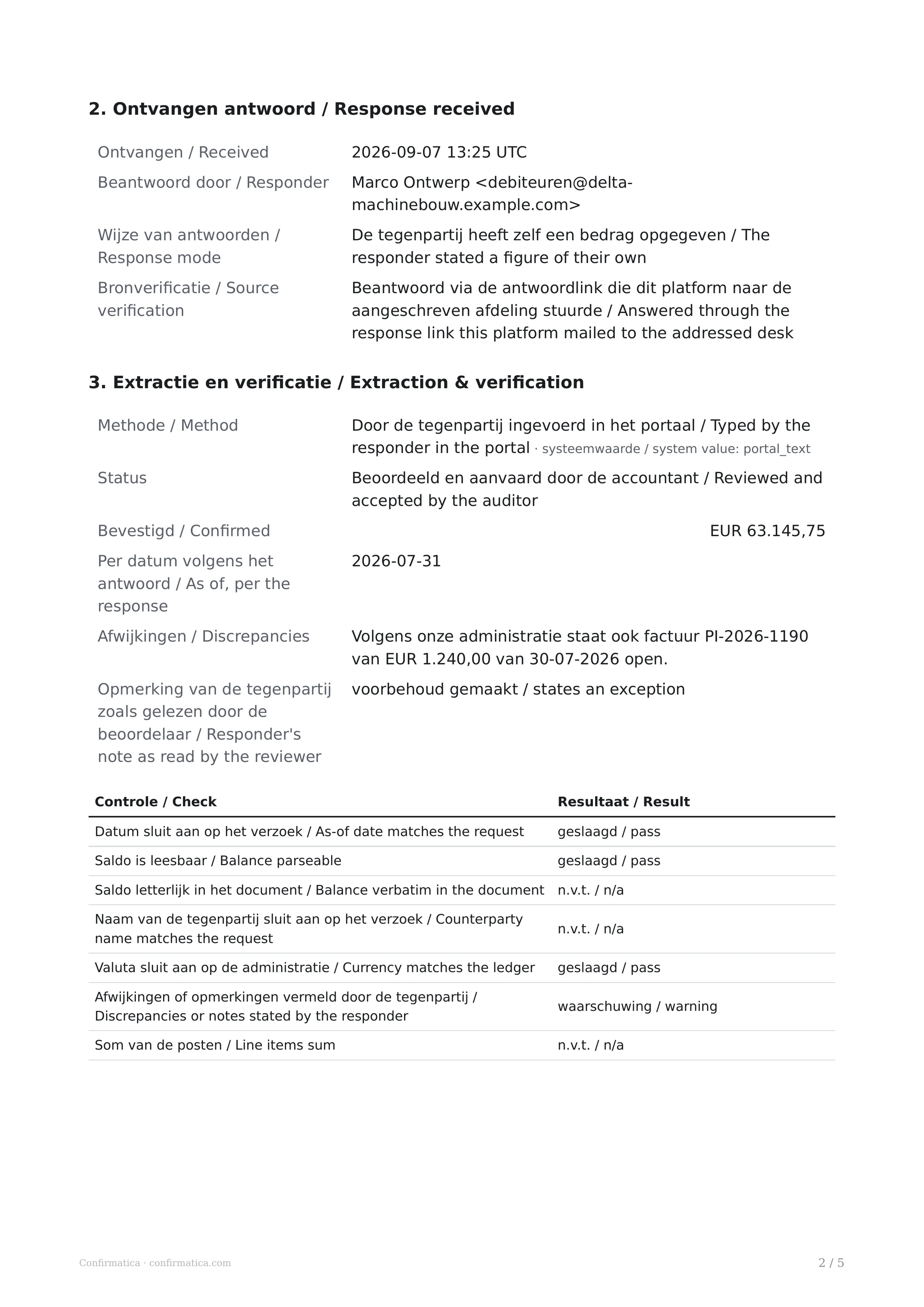
Per-confirmation working papers (PDF and XLSX) are regenerated from the event log on every fetch — a stale copy is never served. Batch lead schedules summarize per-books, confirmed, difference and status per row. At close-out, Export evidence pack (ZIP) exports one ZIP: manifest, a fresh verification verdict for the audit trail, a provenance log for every extracted figure, signed authorizations and certificates, dispatch letters, response documents, and all working papers — with the engagement's materiality, performance materiality and each batch's ISA 530 sampling basis stated at the top of it, so a regulator reads the basis of the selection before the selection — and it declares anything it could not include rather than asserting completeness. Designed to ISA 505 / AS 2310 documentation requirements.
At a glance
- Working paper
- One per confirmation, as PDF and as a spreadsheet (XLSX).
- Lead schedule
- Per books, confirmed, difference and status, row by row.
- Evidence pack
- One ZIP, materiality and each batch's ISA 530 basis stated at the top of it.
- What is missing
- Declared by name, rather than completeness asserted.
Part 2: The client's ten minutes
Step 1: The invitation
The signer receives a unique signing link by e-mail — no account, no download. The link is single-purpose and expires after 30 days.
Step 2: Read the actual document
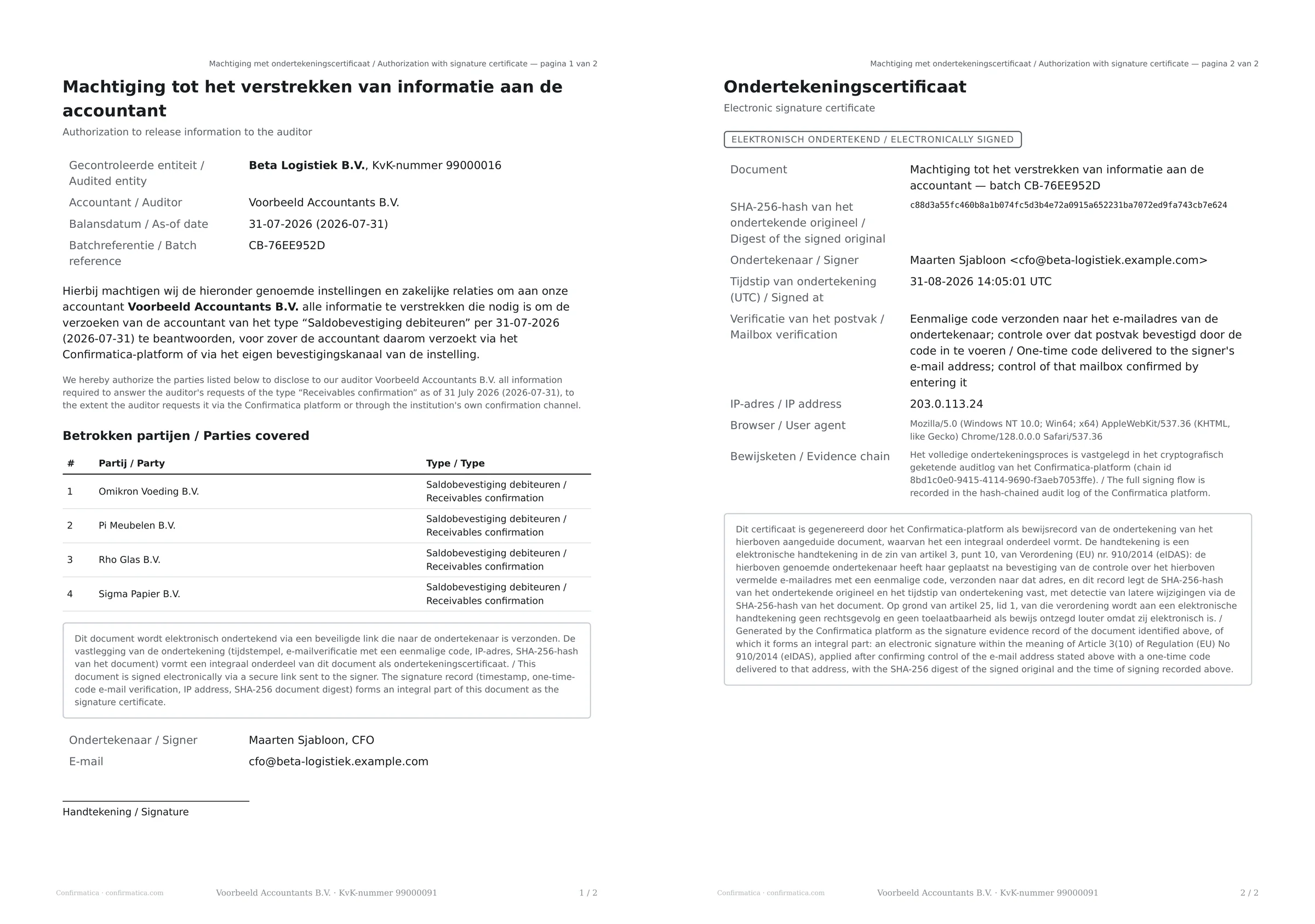
The consent letter renders inline as a PDF — every counterparty listed — with its SHA-256 digest printed on the page. The signer's own language leads, with English printed beside it wherever the two differ, because a secrecy release gets filed and forwarded to people who do not read it; an English letter is simply English. What is signed is exactly what the auditor sends, and both sides can prove it.
At a glance
- On the page
- The authorization itself, every counterparty listed, with its digest printed on the page.
- Languages
- Dutch, English or Czech — the signer's own leading, English beside it where the two differ.
- The choices
- Sign with a one-time code sent to the mailbox, or decline with a reason.
Step 3: Proving the signer is the signer
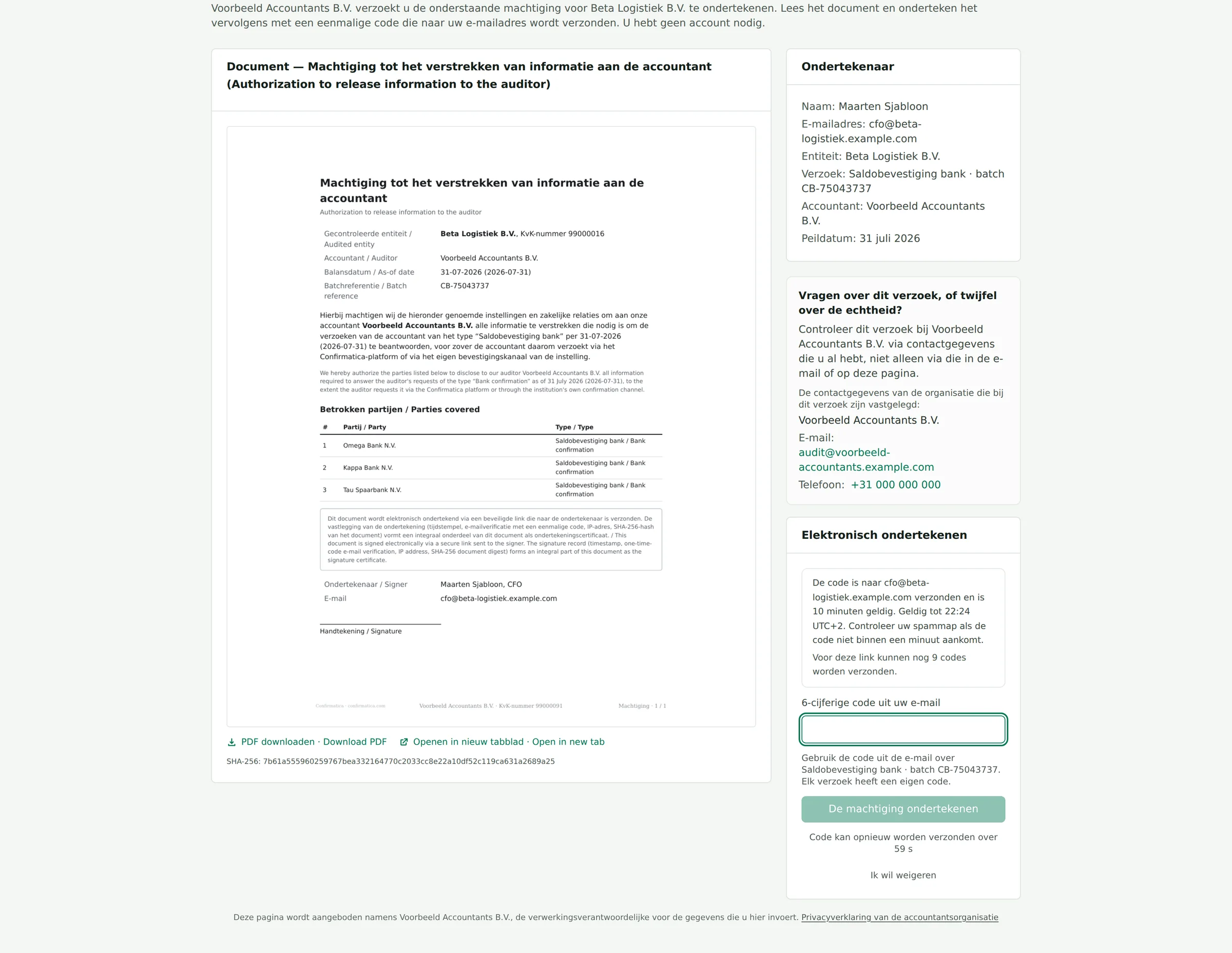
Send verification code e-mails a 6-digit code to the signer — proof that the person signing holds the mailbox the auditor wrote to, valid for ten minutes. Every step is recorded as evidence of the signature: sent, viewed, code verified, signed, each with the time it happened.
Step 4: Sign — or decline with a reason
Sign the authorization adds a signature certificate page to the signed document and moves every awaiting confirmation to authorized; the audit team is notified. Decline to sign is first-class: it requires a reason, returns the batch to draft, and notifies the audit team — nothing proceeds on silence. The signature is an electronic signature with a documented evidence trail: the signer's possession of the e-mailed link and a one-time code to their mailbox, the time, the address and the document digest recorded on a certificate page — deliberately not a qualified signature, and with no per-envelope vendor cost.
Part 3: The responder's two minutes
Step 1: One letter, two reply channels
The request arrives by e-mail, carrying the secure portal link and a unique reply-to address. The letter travels with it — attached, or printed and posted — and carries a reference number and a QR code that opens the same portal; the link is never set in readable type on it. Answer through the portal, or reply to the e-mail; the paper letter's QR code opens that same portal. Both channels end in the same evidence store. Banks that run their own confirmation portals get a workflow type that respects their process and never chases them with automated reminders.
A reply that reaches the firm another way — by post, by fax, in the firm's own mailbox, or downloaded from a bank's own confirmation portal — is filed by the auditor onto the confirmation with a statement of which route it came by, the day the firm received it and who received it. That statement is the document's provenance, and it is printed wherever a reviewer weighs the document.
Step 2: The portal: confirm, upload, type, or decline
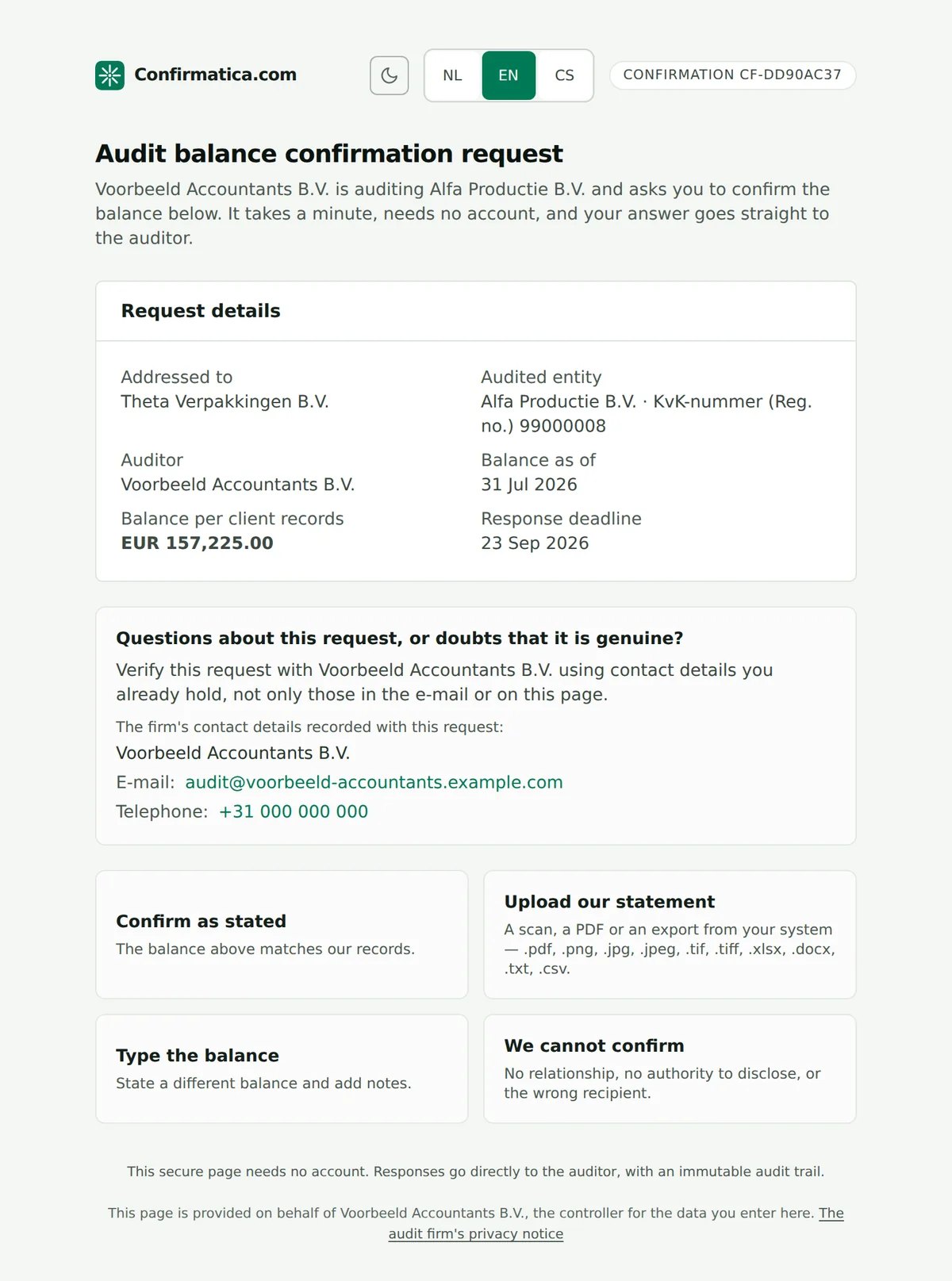
Four tiles: Confirm as stated (one click, name recorded), Upload our statement (PDF, image, spreadsheet, Word, text or CSV, up to 25 MB), Type the balance with discrepancy notes, or We cannot confirm — a structured refusal with a reason code, recorded as a refusal rather than as silence (ISA 505), which stops the reminders and routes the item to alternative procedures. Dutch, English and Czech, auto-detected from the request, switchable by the reader. On a legal request the two balance choices are not offered at all: the lawyer answers the inquiries in writing, or uploads a document.
At a glance
- Account
- None — no login, ever.
- Language
- Dutch, English or Czech, detected from the request and switchable by the reader.
- A legal request
- No balance choice offered: the lawyer answers in writing, or uploads a document.
- A refusal
- Recorded as a refusal rather than as silence, which stops the reminders.
Step 3: Or just reply to the e-mail
Replying to the covering e-mail routes the message — attachments and all — straight to the right confirmation: the reply goes to the unique intake address that message was sent from, which is why nothing has to be retyped or filed. If there is no usable attachment, the e-mail body itself becomes the evidence document. Mail that matches nothing is quarantined for a person to route, never silently dropped.
Step 4: What their two minutes buys the audit
A response through the portal — or an e-mail reply from the institution the request was addressed to — upgrades that contact to network-verified, the strongest provenance tier: earned rather than asserted. A reply from anywhere else is still taken as evidence, but it is recorded as a sender mismatch and routed to a human rather than quietly strengthening the contact, because ISA 505 makes a response from an unexpected source exactly the doubt an auditor must resolve. If a responder stays silent, escalating reminders follow the batch policy with the original secure link still valid.
Part 4: The reviewing partner
Step 1: Approvals with teeth
Three things require the partner or firm-admin role and are refused to everyone else. Approve (partner) locks the sample roster: items can no longer be included or excluded, and changing the selection means generating a new sample. Reissuing an unsigned client authorization requires a recorded reason, because it withdraws an instruction already sent to the client's statutory representative. And sign-off is gated the same way, recorded with the user who gave it and the time they did, and cannot be undone. The work those approvals review stays with the auditor who performed it: alternative procedures are concluded by the engagement team, and never without a substantive written conclusion — the refusal quotes ISA 505.12 back at whoever tried: the judgement cannot be automated. A partner who approves a selection they drew, or signs off a conclusion they recorded themselves, is asked why that is acceptable, and the reason is printed beside the approval: ISA 220 asks for the work to be reviewed by someone other than the person who performed it, and the file shows where it was not.
Step 2: Overrides on the record
Dispatching to a contact below the auditor-verified tier requires a written override reason, written to the audit trail. Editing a verified contact's e-mail resets it to unverified, so the ISA 505 control re-arms itself. Nothing in the directory is deleted: contacts and organizations retire and reactivate, and a GDPR Art. 16 rectification is recorded as one. The design rule everywhere: the machine may propose, verify and assemble — a person decides, and the decision is attributable and timestamped.
Step 3: An audit trail that can be handed to a reviewer
Every recorded change carries who did it and when, and the working paper prints that trail beside the evidence it belongs to. A peer reviewer, an inspector or a regulator reads the file rather than taking the firm's word for it, years after the season closed.
What holds it all up
Licensed, and it runs on the firm's own stack
Confirmatica is licensed software. A licensee deploys on their own infrastructure and is the operator and controller of their instance; Bonfleur provides the licence, customization and maintenance. The demonstration runs on an instance holding synthetic data.Working papers designed to the standards
Selection rationale per ISA 530, verification controls per ISA 505 / AS 2310, documentation regenerated from the event log — designed to those documentation requirements, and packaged for handover in one ZIP.
How a firm comes to run it
Step 1: A demonstration
The season described on this site, run on a demonstration instance holding synthetic data. No firm's data is on it.
Step 2: A licence
A written licence agreement with Bonfleur s.r.o. The licence conversation covers the terms, source escrow, an inventory of every third-party component the software depends on, the deployment runbook and the maintenance agreement — under NDA, alongside the architecture and security documentation.
Step 3: The customizations the firm wants
Letter wording, the firm's own directory, the ledger formats its clients export, and the storage and e-mail providers of the firm's own stack — scoped and agreed with the firm before deployment, not guessed at in advance.
Step 4: Deployment on the firm's own infrastructure
The instance runs on the firm's own infrastructure, under the firm's control. The firm is the operator and controller of it; nothing it holds reaches Bonfleur.
Step 5: Support and maintenance
Bonfleur s.r.o. maintains and supports the deployed instance under the maintenance agreement — updates, fixes and the next season's changes reach the firm's own instance.
Architecture and security documentation is available under NDA.
The walkthrough runs on the platform itself
An enquiry names the firm and the season's volume; what follows is the product described above, run on a demonstration instance holding synthetic data, rather than a slide deck. A licence, the customizations the firm wants, deployment onto its own infrastructure, and support and maintenance by Bonfleur s.r.o. follow from there.